Project Management Software Features
AI assistant, Kanban boards, Gantt charts, RAID logs, OKRs, time tracking and status reports — workspace teams, guest access and in-app knowledge base — all connected, all in one place. Built for project managers who care about outcomes.
AI-Powered Project Management — Projenta AI
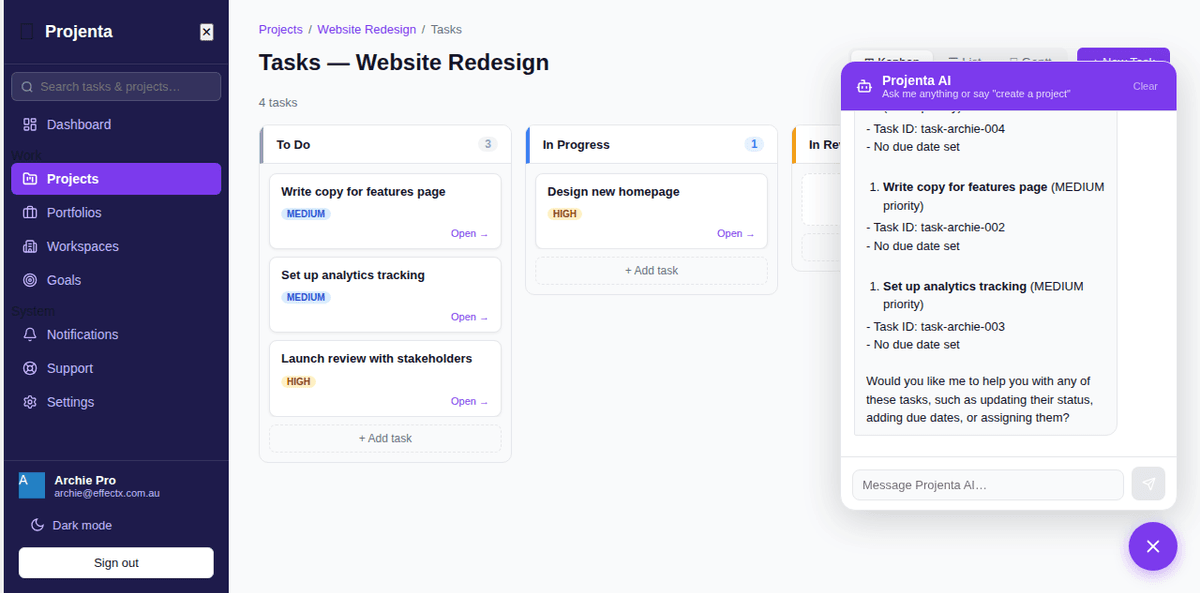
Every page in Projenta has a chat bubble in the corner. Click it and type what you need. Projenta AI automatically chooses the right model for the job, reads your project data and acts on your instructions instantly.
Create tasks, log risks, bulk-update statuses, draft a status report, check goal progress. No menu-diving. No repetitive form-filling. Just type and go.
- Create projects and tasks from a single message
- Bulk-update tasks by status, priority or assignee
- Create and update RAID items — risks, issues, decisions
- Create and track goals and key results
- Draft and publish weekly or fortnightly status reports
- Answer how-to questions about any feature, instantly
- Guide new users from the lower-right help bubble
Try asking Projenta AI...
Workspace Members, Project Teams & Guest Access
Projenta now separates internal collaboration from external visibility. Invite people into a workspace, then assign the right workspace members to each project with a project-specific role.
Workspace owners and admins can invite members, manage pending invite links, change roles, and remove members. Project admins can add editors, reporters, viewers and client viewers to the projects they run.
- Workspace Team pages with email invites and pending invite links
- Workspace roles: Owner, Admin, Member and Viewer
- Project roles: Project Admin, Editor, Reporter, Viewer and Client Viewer
- Last-owner and last-project-admin protection
- Read-only guest links kept separate from internal project membership
Kanban Boards, List Views & Gantt Charts
The backbone of your work. Break projects into tasks, assign owners, set due dates and watch progress update in real time across every view.
Kanban for flow. List for detail. Gantt for the full picture. Filter, sort and slice by priority, assignee or status — find anything in seconds.
- Kanban boards, list views and Gantt charts — same data, three lenses
- Task priorities: Critical, High, Medium, Low
- Assignees, due dates and time estimates
- Subtasks, checklists and comments
- Attachments and activity history
Portfolio Management & Programme Oversight
When you're running five projects at once, you need the view above the noise. Portfolios group projects by client, department or programme — with health indicators that tell you exactly what needs attention.
Executives see the rollup. PMs see the detail. Everyone's looking at the same data.
- Group projects by client, team or programme
- Portfolio-level health indicators (On Track / At Risk / Off Track)
- Roll-up status across all linked projects
- Budget and timeline tracking at portfolio level
OKR Tracking & Goal Management Software
Tasks without goals are just busy work. Projenta lets you set objectives, define measurable key results and link them directly to the tasks your team is already doing.
Progress tracks automatically — On Track, At Risk, Off Track or Achieved — so you never need to manually update a slide deck again.
- Objectives with quantifiable key results
- Link tasks directly to goals — progress auto-updates
- On Track / At Risk / Off Track / Achieved statuses
- Weekly check-ins and goal reviews
- Team and company-level goal hierarchy
RAID Log — Risk, Assumption, Issue & Dependency Tracking
Risks, Assumptions, Issues, Decisions — the four things that kill projects when they live in email threads and people's heads. In Projenta, they're tracked, owned and reviewed.
Every item gets a probability/impact score, an owner and a review date. The RAID log feeds into your status reports automatically — no copy-pasting.
- Separate logs for Risks, Assumptions, Issues, Decisions
- Probability and impact scoring
- Owner assignment and review dates
- Status from Open to Resolved
- RAID snapshot auto-included in status reports
Project Time Tracking & Timesheet Management
Estimates are guesses. Actuals are facts. Log time against tasks and projects so you always know where effort is going — and where it's being wasted.
Compare actuals vs estimates across every task. Export timesheets by person or period. Bill clients accurately. Make smarter forecasts next time.
- One-click timer or manual time entry
- Actuals vs estimates per task and project
- Team timesheets — view by person or period
- Exportable time reports
- Time data surfaces in status reports automatically
Automated Project Status Reports (PSRs)
Stop spending Friday afternoons building slide decks from stale data. Projenta generates professional Project Status Reports from your live project data — in seconds, not hours.
Traffic-light health indicators, RAID snapshot, milestone progress, time actuals. Publish a shareable link or export to PDF — stakeholders get the truth, not a manually curated version of it.
- Auto-generated weekly or fortnightly PSRs
- Traffic-light health: On Track / At Risk / Off Track
- PDF export in A4 or A3 portrait or landscape
- Shareable read-only stakeholder links
- RAID items, milestones and time actuals included
Switching from another tool?
See how Projenta compares
Detailed comparisons for teams evaluating alternatives.